Connecting to the Google Search Console API requires several steps. Here is a step-by-step guide on how to connect to the Google Search Console API:
First, connect your website to Google Console in URL Prefix mode:
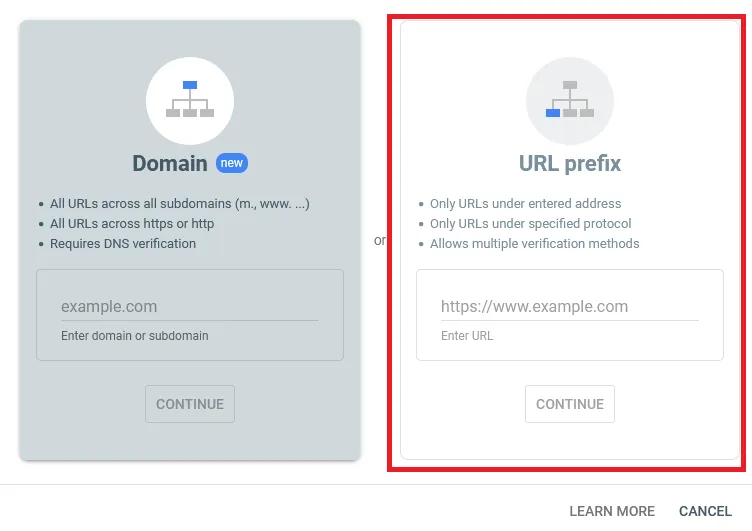
1. Create a Google Cloud Platform (GCP) project and enable the Search Console API
First, you need to create a Google Cloud Platform (GCP) project and enable the Search Console API. Follow these steps:
- Go to the Google Cloud Console and sign in with your Google account.
- Click on the project dropdown menu at the top of the page and select "New Project".
- Give your project a name and click on the "Create" button.
- Once the project is created, select it from the project dropdown menu.
- Go to the APIs & Services Dashboard and click on the "Enable APIs and Services" button.
- Search for "Search Console API" and click on the result.
- Click on the "Enable" button to enable the API.
Create API credentials
Create API credentials
Next, you will need to create API credentials for your project.
- In the Google Cloud Console, navigate to the "APIs & Services" section and click on "Credentials" in the left-hand menu.
- Click the "Create Credentials" button and select "API key".
- Copy the API key that is generated.
Set up OAuth 2.0 authentication
To authenticate your API requests, you will need to set up OAuth 2.0 authentication. Follow these steps:
- In the Google Cloud Console, navigate to the "APIs & Services" section and click on "Credentials" in the left-hand menu.
- Click the "Create Credentials" button and select "OAuth client ID".
- Select "Web application" as the application type and enter a name for your client ID.
- In the "Authorized JavaScript origins" field, enter the URL of our web application. "https://gconsole.netlify.app/"
- In the "Authorized redirect URIs" field, enter the URL of our web application followed by "https://gconsole.netlify.app/".
- Click "Create".
- Copy the "Client ID" that is generated.
Save Your Data
-
Open the dashboard sidebar on the left side of the screen.
-
Find the input fields labeled "API Key" and "Client ID". These are the fields where you will need to enter your Google Search Console API credentials.
-
Enter your API key in the "API Key" input field.
-
Enter your client ID in the "Client ID" input field.
-
Once you have entered your credentials, click on the "Save" button located at the bottom of the sidebar. This will save your credentials and allow you to connect to the Google Search Console API.
-
After clicking the "Save" button, you should see a success message indicating that your credentials have been saved.
-
You can now use the dashboard to access your Google Search Console data and perform various tasks related to your website's search performance.
Note: Please be aware that storing API credentials in local storage can pose a security risk if the device or browser is compromised. It is recommended that you use a secure storage mechanism for production environments.